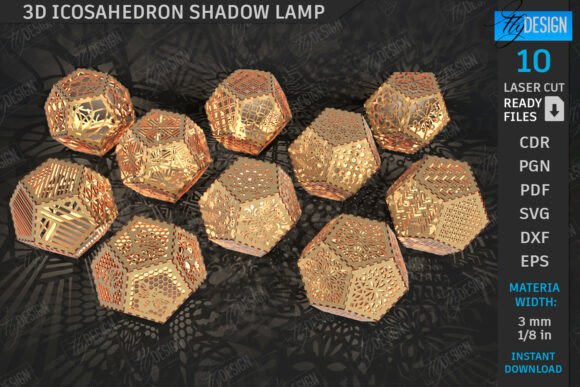
3D Icosahedron Lanterns Laser Cut Bundle
Crafting intricate geometric lighting can transform a simple desk or shelf into a stunning focal point. The 3D Icosahedron Lanterns Laser Cut Bundle offers a sophisticated solution for makers who want to create complex, faceted shadows and ambient light effects without spending weeks on design work. This digital asset pack is designed specifically for laser cutting machines, providing the precise vector data needed to cut wooden patterns that assemble into beautiful desktop lamps. However, simply purchasing the files is only the first step. To ensure your final project looks professional rather than amateurish, you must understand file compatibility, software nuances, and assembly logistics before you ever hit the "cut" button.
Understanding What You Are Buying
It is crucial to clarify that this is a digital product, not a physical item. When you purchase the bundle, you are receiving a zip archive containing the raw materials for creation: 10 SVG files, 10 EPS files, 10 transparent PNG images, 10 PDF documents, and 10 DXF files. These formats cater to different workflows, ensuring that whether you use CorelDRAW, Adobe Illustrator, Inkscape, or direct-to-machine software, you have a compatible file type.
The appeal of the icosahedron shape lies in its symmetry and the way it fractures light. Unlike standard square or cylindrical lanterns, the triangular facets of an icosahedron cast dynamic, star-like shadows when illuminated from within. For hobbyists and small business owners alike, these files allow for rapid prototyping and consistent production runs, making them ideal for Etsy sellers, interior decor enthusiasts, or anyone looking to add a modern touch to their home office.
Common Pitfalls with Software Compatibility
One of the most frequent sources of frustration for users involves software distortion, particularly when using Lightburn. While Lightburn is a powerful and popular interface for laser engravers and cutters, it does not always interpret SVG dimensions accurately. Users often report that after importing an SVG file, the resulting cuts are scaled incorrectly—either significantly larger or smaller than intended. This discrepancy can ruin a piece of wood, waste material, and lead to unnecessary costs.
If you are planning to use Lightburn, the best practice is to avoid SVG files entirely for the actual cutting process. Instead, utilize the included DXF files. DXF (Drawing Exchange Format) is a more stable vector format for many CNC and laser applications, preserving dimension integrity far better than SVG in certain rendering engines. By switching to DXF, you minimize the risk of scaling errors and ensure that your icosahedron pieces fit together seamlessly during assembly.
Why File Choice Matters
- SVG Files: Great for graphic design software like Illustrator but prone to scaling issues in some laser controllers.
- DXF Files: The recommended format for Lightburn and other direct-cutting software due to superior dimensional accuracy.
- EPS/PDF: Useful for legacy systems or specific vector editors, though they may require additional conversion steps depending on your machine’s capabilities.
Material Selection and Machine Readiness
Before downloading and attempting to cut, verify that your hardware and software ecosystem is ready. Not all laser cutters handle fine geometric details equally well. An icosahedron requires precise joints; if your laser beam width (kerf) is too wide or your focus is inconsistent, the interlocking parts may be too tight to assemble or too loose to hold their shape.
Additionally, consider the material thickness. These designs typically assume a standard plywood or acrylic thickness, usually between 3mm and 5mm. If you plan to use thicker wood, you may need to adjust the joint tolerances manually, which requires a good understanding of vector editing. Beginners should stick to the recommended material thicknesses to avoid frustration. Always run a test cut on scrap material to calibrate your power and speed settings. This small investment of time prevents costly mistakes with your primary stock.
Visualizing the End Result
The bundle includes 10 transparent PNG files. Do not overlook these assets. They serve as excellent reference images for visualizing how the finished lantern will look once lit. Since laser cutting creates solid shapes, the internal structure relies on light passing through the edges or pre-drilled holes (if added). Reviewing the PNG previews helps you understand the density of the pattern and anticipate the shadow play. This visual confirmation is vital for marketing purposes if you intend to sell these items; high-quality mockups derived from these PNGs can significantly boost your listing appeal.
Support and Customization Options
No two projects are identical, and sometimes standard files do not meet specific needs. Perhaps you require a larger size for a floor-standing lamp, or you need a PNG file in a specific color profile for print materials. The seller encourages direct communication for such requests. If you find that the default sizes do not fit your workspace or aesthetic vision, reaching out for alternative file types or resized PNGs can save you hours of manual resizing work. Manual resizing in vector software can sometimes distort line weights or break complex paths, so getting a professionally adjusted file ensures the integrity of the design remains intact.
Final Checklist Before Cutting
To ensure a smooth experience with your 3D Icosahedron Lanterns Laser Cut Bundle, keep the following checklist in mind:
- Verify File Formats: If using Lightburn, prioritize DXF over SVG.
- Check Dimensions: Measure a test cut to confirm scale matches your expectations.
- Inspect Joints: Ensure your machine’s kerf compensation allows for snug but insertable fits.
- Review References: Use the provided PNGs to plan your lighting and assembly orientation.
- Contact Support: Reach out if you need non-standard sizes or specific color variations for presentation.
By approaching this digital bundle with technical awareness and proper preparation, you can produce stunning, professional-grade icosahedron lanterns. The difference between a failed project and a masterpiece often lies in the details of file handling and machine calibration. Take the time to get those details right, and you will be rewarded with a beautiful, functional piece of art that highlights the precision of laser cutting technology.