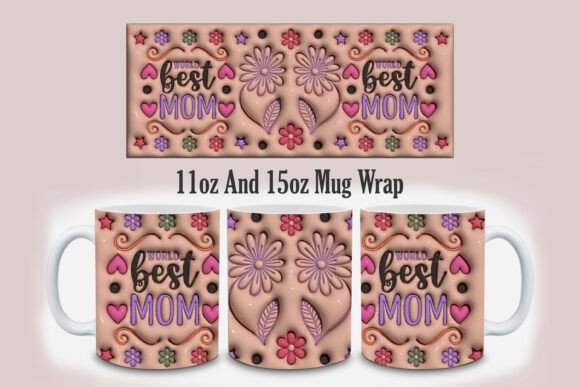
3D World Best Mom Mug Design PNG
Finding the perfect digital asset for a custom gift can feel overwhelming, especially when you are looking for something that captures sentiment with high-quality visuals. The 3D World Best Mom Mug Design PNG has become a popular choice among creators who want to produce professional-looking merchandise without investing in expensive 3D modeling software or hiring graphic designers. This specific design, often associated with the "World Best Mom" theme, offers a realistic, inflated aesthetic that stands out on tumblers and mugs. However, simply downloading a file is only the first step. To ensure your final product looks polished and meets customer expectations, there are several technical and practical considerations you must address before printing.
Understanding the Format and Resolution
When evaluating digital designs, the file format is critical. You will typically receive this design as a PNG file, which is preferred for sublimation printing because it supports transparency. This allows the background of the design to blend seamlessly onto the mug or tumbler, regardless of the base color of the item. More importantly, the resolution determines the clarity of your print. A standard web image might look fine on a screen but will appear pixelated and blurry when printed large. The design specifications usually call for 300dpi (dots per inch), which is the industry standard for high-quality printing. If you use an image with a lower dpi, the text "World Best Mom" may lose its crisp edges, making the gift look cheap rather than thoughtful.
Many beginners make the mistake of resizing images directly in basic photo editors like MS Paint or simple online tools. These programs often degrade quality when scaling up. Instead, always start with the highest resolution source file available. In the case of the 3D World Best Mom 3d Inflated Tumbler design, maintaining the integrity of the 3D effect requires precise dimensions. If you stretch the image to fit a different cup size, the inflation effect will look distorted, ruining the realistic appearance that makes the design appealing in the first place.
Matching Design Dimensions to Product Size
One of the most common errors in custom merchandising is ignoring the physical dimensions of the design relative to the product. The package for this specific design typically includes two distinct file sizes tailored for different drinkware:
- 11 oz Mug Design: Sized at 8.5 x 3.5 inches. This is ideal for standard coffee mugs found in most households.
- 15 oz Mug Design: Sized at 9 x 4 inches. This larger format provides more surface area, allowing the 3D text and graphics to breathe and be read more easily from a distance.
If you attempt to use the 11 oz file on a 15 oz tumbler, the design will appear small and disconnected from the product. Conversely, stretching the smaller file to cover the larger area will result in blurriness. Before purchasing or downloading, verify exactly what type of blank merchandise you plan to use. Are you selling to customers who prefer traditional ceramic mugs, or are they looking for modern insulated tumblers? Matching the file dimensions to the substrate ensures a professional finish. For instance, the 3D Inflated Mother’s Day Mug Design relies on shadows and highlights to create depth; if these details are compressed into a small space, the 3D illusion disappears.
Handling Downloaded Files Correctly
Once you have selected the right design, the next hurdle is managing the files efficiently. Most reputable sellers package their assets inside a zip file to reduce download time and keep the folder organized. New users often struggle with this step, either trying to edit files directly within the zip archive or losing track of where the files were saved after extraction.
To avoid confusion, follow a consistent workflow:
- Download the Zip File: Ensure the download completes fully before attempting to open it.
- Extract the Contents: Double-click the folder to open it. Then, click on the file you need and select "Extract" at the top of the window. This creates a copy on your computer, leaving the original zip file intact as a backup.
- Locate Your Files: Most computers send extracted files to the "Downloads" folder by default. Organize these immediately into a dedicated project folder named after the client or the occasion (e.g., "Mother's Day_2024").
Neglecting proper file management can lead to frustration later. If you accidentally overwrite a high-resolution version with a resized one, you cannot recover the original quality. Keeping the master files safe in their original zip archives until you are ready to print is a best practice that saves time and money.
Avoiding Common Printing Mistakes
Even with the perfect PNG file, the final result depends on how you prepare it for printing. A frequent oversight is forgetting to check the background. While PNGs are transparent, some sublimation printers or heat press machines may have issues if the design contains semi-transparent pixels that aren't handled correctly. Always inspect the design on a white background in your editing software to ensure there are no unintended artifacts or jagged edges around the text.
Another critical factor is color calibration. Screens display colors using RGB (Red, Green, Blue) light, while printers use CMYK (Cyan, Magenta, Yellow, Key/Black) ink. Although sublimation printing works well with vibrant RGB colors, significant shifts can occur. What looks like a bright, inflated pink on your monitor might come out slightly duller on the mug. It is advisable to do a test print on a scrap piece of paper or a low-cost item before committing to a premium gift. This helps you gauge how the specific "inflated" texture translates to the physical material.
Evaluating Value and Usage Rights
When considering the 3D World Best Mom Mug Design PNG, also consider the intended use. Are you buying this for personal use to make a gift for your own mother, or are you a business owner planning to sell these items? Understanding the licensing terms is essential. Some digital products are licensed for personal use only, meaning you cannot resell the printed mugs. Others allow commercial use but restrict mass production. Always read the terms provided with the download. Assuming you can use any design commercially without checking can lead to legal issues and financial penalties.
Furthermore, think about the versatility of the design. The "World Best Mom" theme is timeless, but trends change. An inflated 3D style adds a modern touch that appeals to younger demographics, while a classic script font might appeal to older generations. By choosing a design that balances trendiness with broad appeal, you increase the potential marketability of your product. The 3D Inflated Mother’s Day Mug Design is particularly effective because it combines emotional resonance ("Best Mom") with visual novelty (the 3D effect).
Final Recommendations for Success
To get the best results from your 3D World Best Mom Mug Design PNG, treat the process with the same care as any other professional project. Start with the correct file size—whether it’s the 8.5 x 3.5in for 11 oz mugs or the 9 x 4in for 15 oz tumblers. Extract your files properly to maintain organization and quality. Test your prints to account for color variations. And always verify the usage rights to protect your business or personal project.
By avoiding these common pitfalls, you transform a simple digital download into a tangible expression of love and appreciation. Whether you are a seasoned entrepreneur building a brand or a hobbyist creating a unique gift, paying attention to these details ensures that your "World Best Mom" creation is not just another item on a shelf, but a memorable keepsake that truly stands out.