3D Building Signage Mockup: A Practical Evaluation for Professional Presentations
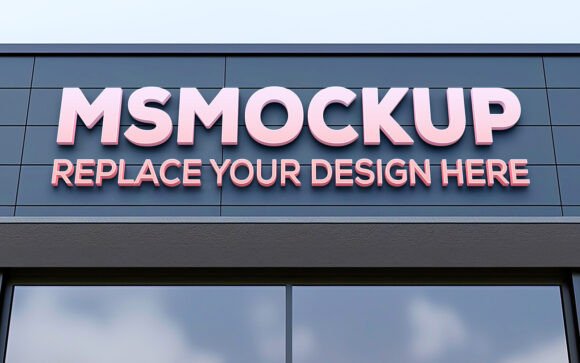
In the competitive landscape of brand identity and architectural visualization, the difference between a flat graphic and a convincing environmental integration often lies in lighting, perspective, and texture. For designers, marketers, and business owners, presenting a logo on a corporate facade requires more than just placing an image over a photograph; it demands realism. This is where a 3D Building Signage Mockup becomes an indispensable asset. Unlike standard 2D overlays that can appear pasted or artificial, high-quality 3D mockups utilize smart object technology to automatically apply shadows, reflections, and perspective corrections, ensuring that your design looks as though it has been physically installed on the building.
This evaluation explores the practical utility, technical features, and workflow benefits of using a dedicated 3D Building Signage Mockup. Whether you are a freelance graphic designer pitching to corporate clients, a real estate agent showcasing a new commercial property, or a small business owner planning your storefront rebranding, understanding the value of this tool helps streamline your presentation process and elevate the perceived professionalism of your work.
The Core Purpose: Bridging Design and Reality
The primary function of a 3D Building Signage Mockup is to visualize abstract concepts within a tangible context. When a client approves a logo or a signboard design in isolation, they often struggle to imagine how it will interact with their physical environment. Does the font size read clearly from the street? Do the colors clash with the brickwork? Is the lighting adequate for nighttime visibility?
A realistic mockup answers these questions instantly. By providing a pre-rendered 3D scene of an office building, corporate exterior, or shop facade, the tool allows users to see their branding in situ. This reduces ambiguity during client approvals and minimizes the risk of costly installation errors. The goal is not merely decoration but effective communication—demonstrating exactly how the final product will look before any physical materials are cut or mounted.
Key Technical Features and Usability
Not all mockups are created equal. A premium 3D Building Signage Mockup distinguishes itself through specific technical capabilities that prioritize ease of use without sacrificing realism. Below are the critical features that define a useful resource in this category.
Smart Object Replacement
The cornerstone of modern Photoshop-based mockups is the Smart Object layer. This feature allows for non-destructive editing. Instead of manually painting over textures or trying to warp a logo into perspective—a tedious and error-prone process—you simply double-click the designated layer. Your design opens in a separate window, you place your artwork, save, and close. The mockup engine automatically maps your design onto the signboard surface, applying the correct perspective distortion.
Automated Lighting and Shadows
Realism hinges on light interaction. A high-quality 3D Building Signage Mockup includes pre-calculated shadow maps and ambient occlusion. When you insert your logo, the software calculates how light hits the sign based on the time of day and weather conditions depicted in the base image. This means your text will cast realistic drop shadows, and glossy materials will reflect the surrounding environment. This level of detail is difficult to achieve manually and is essential for creating a believable presentation.
High Resolution and Editability
For professional printing or large-scale digital displays, resolution is non-negotiable. These mockups typically come in 300 DPI (dots per inch), ensuring crisp output regardless of the display size. Furthermore, the file structure is usually fully layered and organized into folders. This organization allows advanced users to tweak individual elements—such as adjusting the brightness of the sky, changing the color of the building’s cladding, or modifying the depth of field—without breaking the core functionality of the sign replacement.
Practical Applications and Target Audience
The versatility of a 3D Building Signage Mockup makes it suitable for a wide range of professionals. Its utility extends beyond simple logo placement into broader branding and marketing strategies.
- Graphic Designers and Agencies: For agencies, the mockup serves as a powerful sales tool. It allows designers to present comprehensive branding packages that include not just the logo, but its application on signage, vehicle wraps, and building facades. This holistic view increases client confidence and often leads to higher project values.
- Architects and Real Estate Developers: In corporate real estate, first impressions matter. Developers can use these mockups to showcase potential tenant improvements or to highlight the branding opportunities available in a new commercial space. It transforms a static architectural rendering into a dynamic marketing asset.
- Small Business Owners and Entrepreneurs: For those planning a new storefront or office entrance, visualizing the sign beforehand is crucial. A shop sign mockup or office signage preview helps owners make informed decisions about materials, colors, and sizes, reducing the anxiety associated with custom fabrication costs.
- Marketers and Social Media Managers: In the age of digital-first branding, social media content needs to look polished. High-resolution mockups provide engaging visuals for Instagram, LinkedIn, and portfolio sites, helping brands maintain a consistent and professional online presence.
Evaluating Quality and Long-Term Value
When selecting a 3D Building Signage Mockup, several factors determine its long-term value. The most significant indicator of quality is the fidelity of the 3D model. Cheap mockups often suffer from distorted geometry, unnatural lighting ratios, or repetitive textures that give away their artificial nature. In contrast, realistic models feature accurate architectural details, such as proper brickwork patterns, glass reflections, and structural proportions.
Another consideration is flexibility. A good mockup should offer multiple angles and lighting conditions. While a single front-facing view is useful, having options—such as a dusk setting with illuminated signs or a daytime shot with clear skies—adds variety to your presentations. Additionally, the ease of editing is paramount. If the layer structure is chaotic or if the smart object is poorly named, it creates friction in your workflow. Well-organized files save time, allowing you to generate multiple variations quickly.
Reliability is also key. The mockup should remain stable across different versions of Adobe Photoshop. Compatibility issues can render a high-quality file useless. Therefore, checking user reviews and documentation regarding software compatibility is a prudent step before purchase or download.
Potential Limitations and Considerations
While 3D Building Signage Mockups are highly effective, they are not a substitute for actual construction drawings or engineering assessments. They are visual aids, not technical blueprints. Designers must ensure that the proposed sign dimensions comply with local zoning laws and building codes, which a mockup cannot verify.
Furthermore, there is a limit to customization. While you can change the logo and text, altering the fundamental structure of the building or the type of signage material (e.g., switching from acrylic to neon) may require additional assets or manual compositing skills. Users should be aware that achieving perfect material accuracy sometimes requires extra effort beyond simple smart object replacement, particularly when dealing with complex lighting scenarios like night shots with glowing LEDs.
Conclusion
The 3D Building Signage Mockup represents a significant leap forward in how brands visualize their physical presence. By combining high-fidelity 3D rendering with the accessibility of Photoshop smart objects, it democratizes the ability to create professional-grade presentations. For anyone involved in branding, architecture, or marketing, this tool offers a practical, efficient, and visually compelling way to bridge the gap between digital design and real-world application. Its ability to automate complex tasks like lighting and perspective correction allows professionals to focus on creativity rather than technical hurdles, ultimately leading to better client outcomes and more confident decision-making.